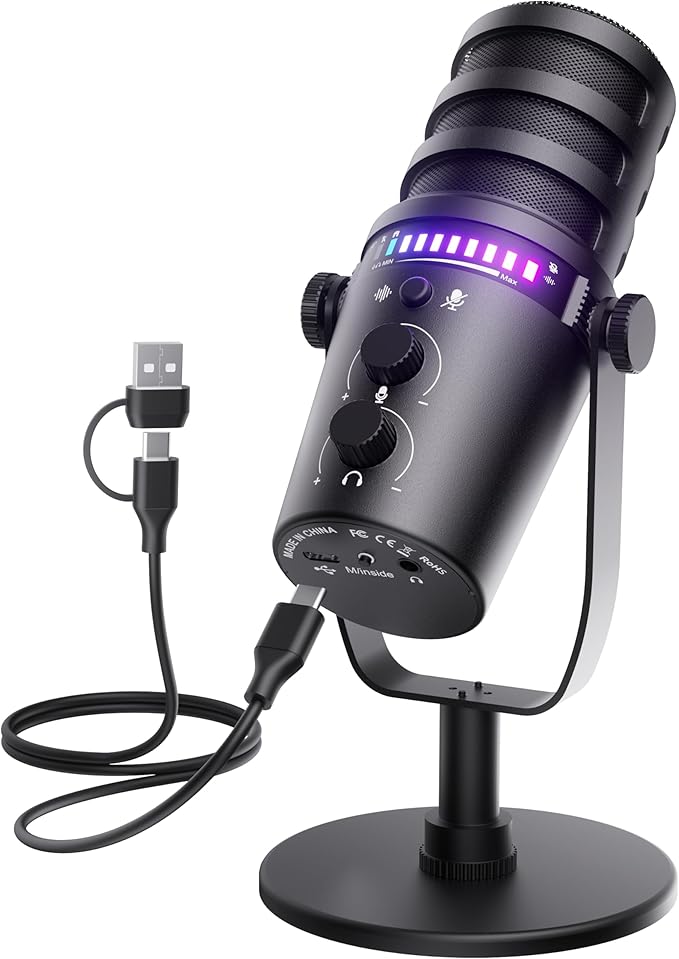
Gaming Microphone for PC, USB Computer Mic with Mute Button, LED Status Light, Gain Control and Headphone Jack, Plug-and-Play for Streaming, Discord, Twitch, YouTube, Podcast, Mac/Windows/PS5
I've been on both sides of bad mic audio. The guy who sounds like he's calling from inside a parking garage. The Discord call where someone's keyboard drowns out their voice. I was that person for longer than I want to admit — running a $12 clip mic into my headphone jack and wondering why nobody could understand me.
When I switched to a proper USB condenser with a gain knob and a real mute button, people in my Discord server actually asked what changed. Not "hey your mic sounds better." More like "wait, is that a new mic?" It was. Here's what I've figured out about this product category since then.
---
## USB vs. XLR: The Part Where I Don't Pick a Side
XLR mics connect to an audio interface and give you more upgrade headroom. Audio people will tell you XLR is the right answer. They're not wrong for the use case they're describing.
But for streaming, Discord calls, YouTube voiceover, and casual podcasting — USB is fine. You plug it in, your OS recognizes it as a USB Audio Device using built-in class drivers (no installation, no downloaded software), and it shows up in OBS, Discord, Audacity, GarageBand, wherever. Windows, Mac, PS5 — same process on all of them.
One actual caveat: USB mics draw power from your port. On laptops with aging USB infrastructure you can get a faint interference hum in recordings. Try a different port first. If that doesn't fix it, a powered USB hub usually does.
---
## The Mute Button and Why a Light Matters More Than the Button
The mute button itself is obvious — press it, you're muted. Fine.
The LED status light is the part people underestimate. It shows you whether the mic is live or muted at a glance, without checking Discord's interface or OBS or anything else on screen. Green means you're transmitting. Red means you're not. That second state is the one that matters.
I've been in more calls than I can count where someone thought they were muted and weren't. You hear their dog, a conversation in another room, sometimes things they'd clearly prefer you didn't hear. With a physical light visible in your peripheral vision, you stop second-guessing. You know. You don't have to tab out of a game to check a UI.
For streamers: it also catches accidental unmutes when you step away from your desk. Your chat will let you know too, but by then the moment has already happened.
---
## Gain Control
Gain sets how sensitive the mic is. Too high, everything clips when you raise your voice. Too low, you're barely audible, which means listeners crank their volume and amplify your room noise in the process.
The right setting depends on how far you sit from the mic, how loud you naturally speak, and how live your room is. It's different for everyone, which is why a physical knob on the mic body is more useful than burying this in software.
Common mistake: cranking gain up because "louder input must be better." You want your voice hitting around -12 to -6 dBFS during normal speech — clear enough to be readable, with room left so peaks don't distort. Turn the knob up from zero until your normal speaking voice lands there, then stop.
---
## The Headphone Jack on the Mic Itself
Most gaming USB mics have a 3.5mm jack on the mic body. You plug headphones there instead of into your computer.
When you monitor through your computer, there's a delay — sometimes 20ms, sometimes more — between speaking and hearing yourself. Even small delays are disorienting in a way that's hard to describe until you've experienced it. You start rushing, or second-guessing your pace, and speaking naturally becomes oddly difficult.
Plugging headphones directly into the mic bypasses the computer entirely. You hear yourself in real time. It's a small thing that makes recording feel noticeably less weird, especially if you're new to monitoring yourself.
---
## Cardioid Pattern and Where You're Actually Pointing the Thing
Most gaming mics are cardioid — most sensitive in front, least sensitive behind. It's a heart-shaped pickup area, which is where the name comes from.
Gaming environments are noisy: mechanical keyboards, case fans, a second monitor, whatever's behind you. Cardioid doesn't eliminate room noise, but it rejects it significantly compared to an omnidirectional mic.
The mistake I see constantly: people mount the mic to the side of their monitor, slightly off-angle, "out of the way." You're now talking into the side of a cardioid element. Quieter signal, and the polar rejection that makes cardioid useful is mostly gone. Point the mic at your face, 6–10 inches out. Angle it slightly down toward your mouth rather than straight at it — this helps with plosives.
---
## Settings by Platform
The mic doesn't change between platforms. Your app settings do.
Discord: modest gain, Krisp noise suppression at medium (not max — at full suppression your voice starts sounding slightly processed), echo cancellation on. You want clarity, not fidelity.
OBS/Twitch/YouTube: capture a clean dry signal and handle processing there, or in post. Discord's suppression is aggressive enough that it can make you sound robotic to a streaming audience. Unprocessed audio with good source conditions usually beats heavy software filtering.
Podcasting: clean dry signal on capture, no processing in the moment. Add light compression and EQ in your editor afterward. Acoustic treatment matters more here than anywhere else — if your room is reverberant, no plugin fully fixes it.
PS5: adjust mic level in the console's audio settings, keep it at 70–80% as a starting point. Maxing it out pushes into noise territory.
---
## What You're Actually Getting for $50–$100
A USB gaming mic in this range is a condenser element in a consumer housing. It's not a recording studio mic, and it won't fix a bad room. Condensers pick up more detail than dynamic mics — including room noise you didn't notice with your old headset.
The three things that matter more than which mic you buy: your room (hard parallel walls are your problem), your distance from the mic, and your gain setting. A cheap mic used correctly in a decent acoustic environment will consistently beat an expensive mic in a bad one.
That's worth knowing before you spend more than you need to.