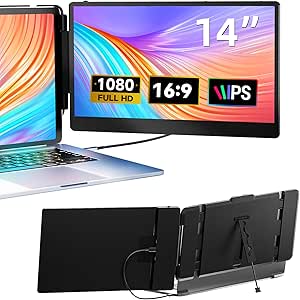
Laptop Screen Extender, 14" FHD 1080P IPS Dual Laptop Monitor Extender, Plug n Play Portable Travel Monitor for Laptops 13.3"-17" with HDMI/USB-A/Type-C, Compatible with Windows Mac Chrome Android
I've been working from cafes, airports, and hotel rooms long enough to know that laptop screens are a lie. They look fine at home, surrounded by your proper monitor setup. The moment you're somewhere else — some narrow desk in a Marriott, or a corner table at a coffee shop — 13 inches feels like you're reading through a mail slot.
So I picked up a 14" FHD 1080P IPS dual laptop monitor extender and used it for a few weeks. No sponsored deal. Just the thing and what I thought of it.
---
Setup took about four minutes the first time. I plugged in the USB-C cable before reading anything, and it just came on. The bracket clips to your laptop lid with two thin arms — fiddly the first couple of times, then fast enough that you stop thinking about it. The manual is a single folded card, which is exactly as much documentation as something this physical should have.
The extender has USB-C, USB-A, and HDMI ports. I used USB-C because my laptop has it. I tested it briefly on a borrowed Windows machine and it auto-detected fine. The listing says Mac, Chrome, and Android work too. I tested Mac and Windows. I'll take their word on the rest.
One thing worth knowing: the screen sits behind your main display, slightly elevated. On a flat desk it's stable. On your lap it gets wobbly fast. I didn't try to use it that way more than once.
---
The panel is IPS, so colors hold at an angle and text stays readable without squinting. 1080p is honest — you're not getting a Retina display, but you're not getting a washed-out TN panel either. I used it for writing, spreadsheets, email, and keeping a reference window open while working. It handled all of that.
If you drag a window from a MacBook Pro's screen onto this one, you'll notice the resolution gap. It's not jarring, but it's there. On a Windows laptop with a standard 1080p built-in display, the match is closer. Brightness is fine indoors. I wouldn't use it at a table outside on a sunny day, but that's true of most portable monitors.
---
There are a few things that annoyed me. The hinge that adjusts the screen angle is stiff out of the box — not broken, just stiffer than I expected. It loosened up naturally within a week. The extender also adds real weight to the back of the lid. I grabbed my laptop by the screen once without thinking and caught myself immediately, but it's the kind of thing you only need to do once to remember not to do again. And the USB-C power draw is noticeable on battery. Over a three-hour flight without a charger, I lost roughly 10–15% more than usual. Not a dealbreaker, just something to know.
---
Here's where I land on it: this isn't for people with a real desk setup. If you have a monitor at home, this thing has nothing to offer you there. It exists for the specific situation where you're working out of a bag and you've started switching between windows so often that it's slowing you down.
I'm in that situation a few times a month. Having a second screen meant I could keep one thing visible while I worked in another without tabbing back and forth constantly. That's not an exciting thing to say about a product, but it's the true thing.
I've used it on six trips. The bracket has held, the screen hasn't flickered, nothing has broken. I'll keep packing it. That's probably the most I can say about a piece of travel gear.